Join Our Discord Community — Get the latest updates, exclusive perks, and free bonuses
GPT Image 1.5
Next-Generation AI Image Creation
Experience GPT Image 1.5 - the versatile AI image generator that brings your creative vision to life. From text descriptions to image transformations, create professional-quality images with flexible quality settings and multiple resolution options.
Advanced Settings
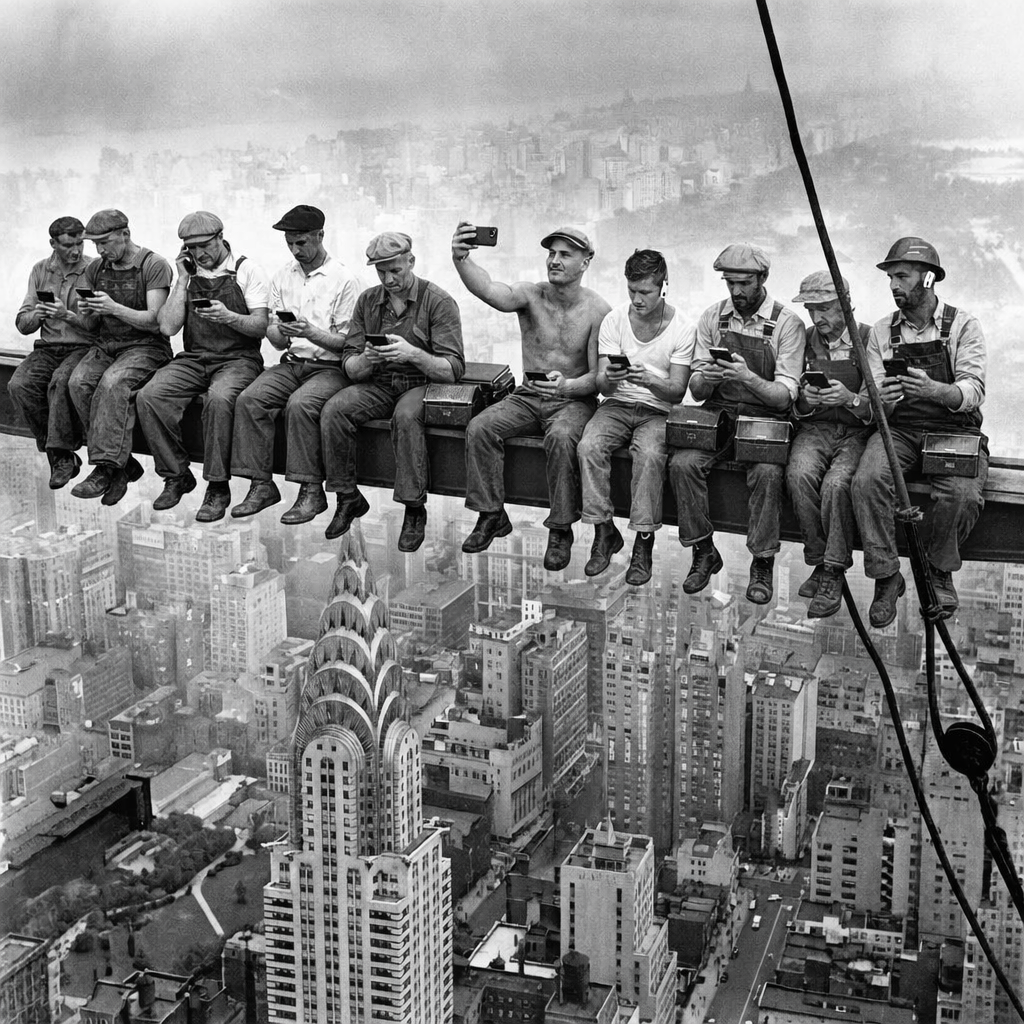
Same workers, same beam, same lunch boxes - but they're all on their phones now. One is taking a selfie. One is on a call looking annoyed. Same danger, new priorities. A hard hat has AirPods.
Click to use this example
What is GPT Image 1.5 AI Image Generator?
GPT Image 1.5 is an advanced AI image generator that combines cutting-edge technology with user-friendly controls. Whether you're creating from text descriptions or transforming existing images, GPT Image 1.5 delivers professional results with flexible quality settings (Low, Medium, High) and multiple resolution options up to 1536x1024 pixels. Perfect for designers, marketers, content creators, and anyone needing AI-powered image generation.
Dual-Mode AI Image Generation
GPT Image 1.5 offers both text-to-image and image-to-image generation modes. Create entirely new images from text prompts, or transform existing images while maintaining composition and style. This versatility makes it perfect for diverse creative projects, from concept art to product mockups and visual storytelling.
Flexible Quality & Resolution Control
Choose from three quality levels (Low, Medium, High) to balance speed and detail. Select from multiple resolution options including square (1024x1024) and landscape/portrait formats (1536x1024, 1024x1536). Generate multiple images in one batch for rapid iteration and creative exploration.
Smart Background & Format Options
GPT Image 1.5 offers intelligent background handling with Auto, Transparent, and Opaque modes. Export in PNG, JPEG, or WebP formats to meet your project requirements. Advanced seed control ensures reproducible results for consistent branding and style.
Why Choose GPT Image 1.5 AI Image Generator
GPT Image 1.5 combines powerful AI technology with practical features designed for real-world creative workflows. From quick concepts to polished finals, it adapts to your needs.
Traditional Image Creation
- Hours spent on manual design and editing work
- Limited to single input method (drawing or photo editing)
- Expensive software and learning curve required
- Difficult to iterate and experiment with variations
GPT Image 1.5 AI Generator
- Generate professional images in seconds with AI
- Dual-mode: create from text or transform existing images
- Simple interface with powerful customization options
- Batch generation and quality controls for rapid iteration
Fast & Efficient Generation
GPT Image 1.5 delivers quick results without compromising quality. Choose Low quality for rapid prototyping, Medium for balanced performance, or High for final production work. Batch generation lets you create multiple variations simultaneously.
Professional Image Quality
Three quality tiers ensure you get the right balance of detail and generation speed. High-quality mode produces images suitable for commercial use, marketing materials, and professional projects with crisp details and accurate rendering.
Flexible Pricing Options
Tiered pricing based on quality and resolution means you only pay for what you need. Low-quality generations start at just 10 credits, making experimentation affordable. Scale up to high-quality for final deliverables.
Versatile Creative Control
Text-to-image mode for creating new concepts. Image-to-image mode for transforming references. Multiple resolution options for different use cases. Background control for transparent PNGs or solid backgrounds. Format selection for optimal file size and quality.
Streamlined Creative Workflow
Integrated batch processing, seed control for reproducibility, and multiple export formats keep your creative workflow smooth. Generate variations, refine prompts, and export ready-to-use images without switching tools.
Consistent & Predictable Results
Seed control ensures reproducible results across generations. Background options give you transparency when needed. Multiple format exports provide flexibility for different platforms and use cases without quality loss.
How to Use GPT Image 1.5 AI Image Generator
From idea to finished image in four simple steps. GPT Image 1.5 makes professional AI image generation accessible to everyone.
Choose Your Generation Mode
Select Text-to-Image to create from descriptions, or Image-to-Image to transform existing images. Text mode is perfect for new concepts, while Image mode excels at style transfer, reimagining scenes, and creative variations of reference images.
Configure Quality & Settings
Select your desired quality level (Low for speed, High for detail), choose resolution and aspect ratio, set background handling (Auto, Transparent, or Opaque), and pick your output format (PNG, JPEG, WebP). Optionally set a seed for reproducible results.
Enter Prompt & Generate
Write a detailed text prompt describing your vision. For Image-to-Image mode, upload reference images. Click generate and GPT Image 1.5's AI processes your request, creating images that match your specifications with your chosen quality and settings.
Review & Download Results
Preview generated images in high resolution. Download in your selected format for immediate use. Need adjustments? Modify your prompt or settings and regenerate. Use batch generation to create multiple variations at once for creative exploration.
GPT Image 1.5 Frequently Asked Questions
Common questions about GPT Image 1.5 AI image generator
Start Creating with GPT Image 1.5 AI Image Generator
Join creative professionals using GPT Image 1.5 for flexible, fast, and high-quality AI image generation.